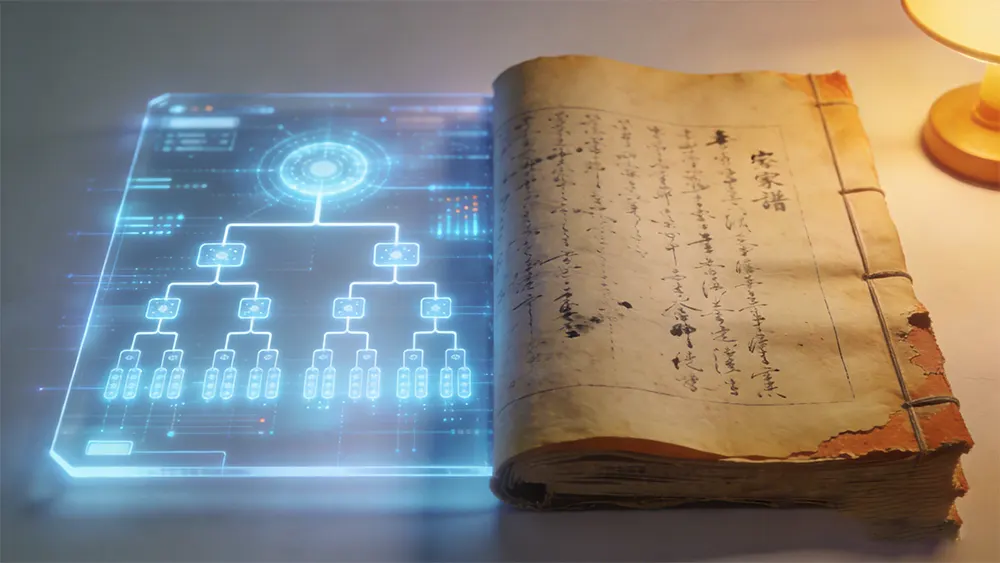
“Is your family tree paper or electronic?”
A decade ago, almost no one asked this question — we all defaulted to paper. But today, more and more people hesitate when compiling family trees: which form should I use?
This article objectively compares the two family tree forms and provides an actionable “dual-track preservation” plan.

1. Conclusion First: They Are Not Substitutes
Many see “electronic vs paper” as either-or, but they solve different problems:
| Form | Core Advantage | Irreplaceable Scenario |
|---|---|---|
| Paper Family Tree | Ceremonial, emotional value, long-term preservation | Enshrinement, inheritance, family ceremonies |
| Electronic Family Tree | Search, collaboration, backup, AI assistance | Inquiry, supplementation, cross-regional collaboration |
A truly mature modern family tree should be “paper-electronic dual-track.”
Below is our detailed analysis.
2. Three Irreplaceable Advantages of Paper Family Trees
2.1 Ceremonial and Emotional Value
Holding a paper family tree in your hands has weight. Opening Xuan paper and seeing ancestors’ handwriting, that emotional connection can’t be replaced by a screen.
The older generation seeing a hardcover paper genealogy will feel “this is what a real family tree is.” This recognition is extremely important for family cohesion.
2.2 Long-Term Preservation
Many people think electronic data is more reliable, but with proper maintenance, paper family trees can be preserved for hundreds or even thousands of years.
- Song-Yuan family trees have survived 700-1,000 years
- Many Republican-era family trees are still well-preserved
- Key is using Xuan paper, thread binding, insect-proofing and moisture-proofing
2.3 Independence
Paper family trees don’t depend on any technology, platform, or electricity. Even if the world ends or the internet goes down, you can still open a paper tree and read it.
This is the “ultimate backup” that electronic family trees can never achieve.
3. Four Modern Advantages of Electronic Family Trees
3.1 Search and Query
A 500-page paper family tree takes half a day to find someone. Electronic family trees find them in 0.1 seconds.
You can search by name, birth year, native place, occupation and many other dimensions, and combine filters.
3.2 Multi-End Sync and Collaboration
Paper family trees can only be held by one person; others must borrow to see. Electronic family trees allow dozens of family members to collaborate online simultaneously.
- An uncle in America can fill in his branch’s information
- A cousin working elsewhere can upload old photos
- Everyone fills in their part, automatically aggregating at the end
3.3 AI Assistance
Paper family trees require manual organization of OCR, old photo recognition, and relationship inference. Electronic family trees can leverage AI:
- Old photo OCR for automatic text conversion
- Face recognition for automatic categorization
- Relationship inference to fill missing information
- Multi-language translation breaks national borders
3.4 Multiple Backups
A paper family tree is lost if damaged. Electronic family trees can be backed up to:
- Local hard drive
- External hard drive
- Cloud drives (Baidu Netdisk, Alibaba Cloud Drive, etc.)
- Multiple devices
An electronic family tree can theoretically achieve “never lost.”
4. Risk Comparison: Paper vs Electronic
| Risk Type | Paper Family Tree | Electronic Family Tree |
|---|---|---|
| Fire | Almost impossible to recover | Multi-backup recoverable |
| Flood | Almost impossible to recover | Multi-backup recoverable |
| Insect/mold | Easy after long time | Almost never occurs |
| War | Many lost in history | Multi-backup recoverable |
| Theft | Cannot be copied | Can be reprinted |
| Hacker attack | N/A | Avoid with trusted platforms |
| Server shutdown | N/A | Avoid with exportable data platforms |
| Format obsolescence | N/A | Avoid with universal formats (PDF, JSON) |
| Hardware failure | N/A | Multi-backup recoverable |
| Operational error | Hard to modify | Revision history allows rollback |
Conclusion: Electronic family trees win on physical risks; paper family trees win on technical risks.
Dual-track preservation = using electronic against physical risks + using paper against technical risks = close to 100% reliability.
5. Five Common Misconceptions About Electronic Family Trees
Misconception 1: Excel Is Enough
Excel is fine for recording a few generations, but when the family exceeds 100 people and 5 generations, Excel becomes extremely hard to maintain. Recommend at least using professional family tree software.
Misconception 2: Online Platforms Are Always Safe
Large platforms (FamilySearch, MyHeritage) are relatively reliable, but small platforms may shut down and lose data. Recommend choosing platforms that support export to standard formats (GEDCOM, PDF, JSON).
Misconception 3: Cloud Drive Backup Is Enough
Cloud drives are convenient, but account bans, platform shutdowns, and accidental deletions happen frequently. At least simultaneously backup to local hard drive + cloud drive.
Misconception 4: Electronic Family Trees Don’t Need Printing
Wrong. At least print one paper version as “ultimate backup,” stored in different physical locations (parents’ home, relatives’ home, bank safe deposit box).
Misconception 5: AI Solves Everything
AI is a tool, not a replacement. Mining family stories, organizing family emotions, distilling family values still need to be done by people.
6. Dual-Track Preservation Best Practice
Here is an operational checklist for “paper-electronic dual-track”:
Phase 1: Establish Electronic Family Tree (Do First)
- Choose family tree software (recommend Family Tree Design, desktop + AI-assisted)
- Enter all known information into the system
- Upload old photos, old document scans
- Multi-end backup (local + cloud + at least one offline)
Phase 2: Supplement Paper Family Tree (Do Later)
- Every few years (e.g., 5-10 year compilation cycle) organize a hardcover paper version
- Use Xuan paper or high-quality paper, thread-bound or glued
- One enshrined in ancestral hall or family activity room
- One stored in bank safe deposit box
- One kept by the oldest elder in the family
Phase 3: Long-Term Maintenance
| Cycle | Task |
|---|---|
| Monthly | Add new information, backup |
| Annually | Check backup integrity |
| Every 3-5 years | Reorganize electronic family tree |
| Every 5-10 years | Create new paper family tree version |
7. Special Case: What If You Only Have Old Paper Family Trees?
Many families already have old paper family trees but no electronic version. Suggestions:
- Rescue priority: Use scanner or phone to photograph in high definition
- OCR recognition: Use professional OCR tools (Adobe Acrobat, Baidu Netdisk OCR) to convert old genealogy text to electronic
- Supplement structure: Pair scans with manually entered electronic data for easy retrieval
- Multi-location storage: Original + high-quality replica + electronic version, stored in 3+ locations
Frequently Asked Questions (FAQ)
Q1: What Paper Is Best for Paper Family Trees?
Xuan paper (raw or cooked) is ideal, with neutral pH and not easily aged. Regular A4 paper yellows and becomes brittle in 5-10 years, while Xuan paper can be preserved for over a hundred years.
Q2: What Format Is Most Stable for Saving Electronic Family Trees?
GEDCOM is the international standard family tree exchange format, supported by nearly all family tree software. PDF for printing or reading. JSON / XML for program processing. Recommend exporting all three formats simultaneously.
Q3: Should Paper Family Trees Be Laminated?
Not recommended. After lamination, paper is not breathable and easily molds inside. The correct approach is dry environment + insect repellent + regular airing.
Q4: Will Electronic Family Trees Be Hacked for Privacy?
Depends on platform choice. Choose local storage (desktop software) or trusted large platforms, avoid using small companies and unknown websites. Don’t put sensitive information like ID numbers and bank accounts in electronic family trees.
Q5: Can I Have Only an Electronic Family Tree Without Paper?
Not recommended. In extreme situations (no internet, no power, platform shutdown), paper family tree is the last guarantee. At least print one “emergency version.”
Conclusion
Paper family trees and electronic family trees are not opponents, but complementary.
Paper family trees carry emotion, inheritance, and ceremony; electronic family trees carry efficiency, collaboration, and intelligence. A truly mature family tree combines the advantages of both.
The future may be an AI-dominated era, but the weight of paper, the trace of pen, the ceremony of family — these will never become obsolete.
Take both seriously.
Further Reading:
- 📜 Family Trees and Clan Genealogy: A Three-Thousand-Year Cultural Code
- 🛠️ Family Tree Software Comparison: 8 Major Tools in 2026
- 🤖 How AI Helps Smartly Organize Family Trees
This article was written by Tool Person Zhang Wei. Please cite the original source: https://familytree.design.